
PFP Maker: Cat Emoji
AthenaHotCArt & Design
4.077.00 Reviews
- Version
- 1.1.4
- Installs
- 1.00M
- Age Rating
- Everyone
Screenshots
Our Review of PFP Maker: Cat Emoji
 Analysis by Appyee
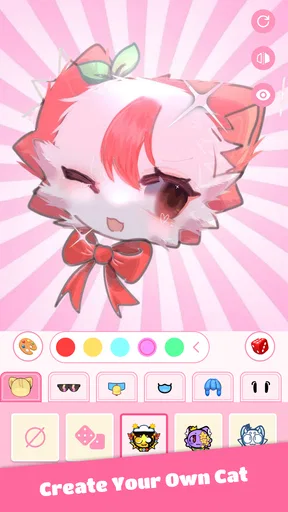
I opened PFP Maker: Cat Emoji expecting a quick way to make a cat-themed profile picture, and that is exactly where this Art & Design app makes the most sense. It is aimed at people who want a cute, personal image without learning a full drawing program. Instead of asking me to sketch a cat from a blank canvas, it turns the creative process into choosing and combining visual details until the result feels like mine.
That approach is especially welcoming if you have never used an avatar creator before. The app comes from AthenaHotC, is free to use, and is suitable for Everyone. It runs on Android 7.0 or later, so it is available to people using older devices as well as newer phones. I also found its purpose refreshingly narrow: this is not trying to be a complete illustration studio. It is a small tool for making cat emojis and profile pictures, and its value depends on how quickly it helps you reach an image you actually want to use.
What to expect before you start creating
The first thing to understand is that this is better viewed as a visual identity tool than as a drawing app. I would not install it expecting layers, detailed brush control, photo retouching, or the freedom of a general-purpose design editor. Its appeal is the opposite. You work within a playful cat-focused style, make a series of visual choices, and arrive at something recognizable without having to understand illustration techniques.
That makes it a natural fit for a messaging profile, a social account, a gaming identity, or a private contact image. A cat avatar can also be useful when I want a consistent online persona without using my own photograph. The result feels more personal than a random stock icon, while requiring much less effort than drawing a character myself.
The store summary describes the central idea clearly: creating cute cat emojis and PFPs for cat lovers. In practice, I think the strongest audience is someone who enjoys small creative decisions. You may not spend hours inside the app, but you can still care about whether the expression, colors, and overall mood match you. The experience rewards experimentation rather than technical skill.
Its popularity also gives a new user some reassurance. The app has passed one million installs and holds a 4.0 average rating from around 2.2 thousand ratings. Those figures do not guarantee that every device or personal taste will produce the same experience, but they suggest that the basic idea has found a substantial audience. The current version is 1.1.4, which is the version I would look for when checking that I am installing the intended app.
There is one important expectation to set early: a simple avatar maker can feel limited if you want complete control. The more you want to manipulate individual shapes, draw unusual markings, or build a polished illustration from scratch, the more likely you are to prefer a dedicated drawing app. PFP Maker: Cat Emoji is strongest when speed, charm, and a clear theme matter more than artistic freedom.
Installing it and getting oriented
After installation, I recommend approaching the first session as a short trial rather than trying to create your permanent profile picture immediately. The most useful first goal is to learn the visual rhythm: choose an option, inspect the result, change one detail, and compare. That keeps the process manageable and makes it easier to understand which choices have the biggest effect on the final cat.
Because the app is free, there is little commitment in trying several directions. I would begin with a deliberately simple design. Pick a basic look, make one or two changes, and pause to see whether the character already communicates the mood you want. New users often change too many elements at once, then cannot tell which decision improved or weakened the image.
A practical setup habit is to decide where the finished picture will be used before polishing it. A profile image is usually seen small, so an elaborate combination may lose its personality when reduced. An emoji used in a conversation can tolerate a stronger expression or more obvious contrast. Thinking about the destination first helps me choose a design that remains readable instead of merely looking attractive while filling the phone screen.
I also suggest keeping the first attempt visually uncomplicated. A cat with a clear face and a distinct mood is more useful than one packed with details that disappear in a tiny circle. This is one of the app’s less obvious lessons: the best result is not necessarily the most decorated result. It is the one that still looks like the same character when viewed quickly.
Reaching the first meaningful result
My definition of a successful first action is not simply opening the editor. It is producing one cat image that I would genuinely consider using. To get there, I would start by choosing the broad personality of the avatar. Do I want something friendly, silly, calm, mischievous, or deliberately dramatic? Once that decision is clear, the smaller visual choices become easier because they support a direction instead of competing with one another.
For a first profile picture, I would favor a face that remains easy to recognize. Look at the preview at a smaller size if possible, or hold the phone farther away for a moment. If the expression becomes unclear, simplify the design. This workflow is more reliable than judging every detail close up, because profile images are commonly displayed as small icons.
For a chat emoji, I would take the opposite approach and make the emotion more obvious. A stronger expression can communicate quickly in a conversation, especially when the image is being used as a reaction rather than as a permanent identity. The same cat does not need to serve both purposes. Creating one restrained avatar and one expressive emoji is a sensible early test of the app’s range.
Another useful technique is to change only one visual category at a time. First settle the face, then consider the surrounding appearance, and finally check the overall balance. When I make several changes together, it is easy to keep a visually noisy version simply because I have become accustomed to it. Single-change comparisons make the decision more deliberate and help reveal which elements actually matter.
Once a design feels close, I would stop editing for a minute and imagine seeing it in a contact list or account menu. Does it remain distinctive beside other circular icons? Does it look like a cat rather than a collection of decorations? Would I recognize it immediately? Those questions are more useful than asking whether every individual part is cute.
How I would use it in everyday situations
Imagine a friend inviting me into a new group chat. I do not want to upload a personal photograph, but I also do not want the default account image. I can use the app to make a cat with a friendly expression, then use that image as a recognizable identity for the group. If the chat becomes more casual, I could create a second, more playful cat emoji for reactions. The first image identifies me; the second helps me communicate tone.
Another realistic use is separating online spaces. I might choose a calm, simple cat for a work-related community and a brighter, more humorous one for friends. This is not about making a professional brand. It is about giving different accounts a visual cue that helps me remember where I am and how I want to present myself.
Parents and younger users may also appreciate the approachable theme, since the content rating is Everyone. I would still treat any avatar creator as a creative tool rather than assuming every child will need the same level of independence. The interface and the amount of choice determine whether a younger user can work comfortably, so I would sit with them during the first attempt and let them discover the combinations at their own pace.
For cat lovers, the emotional appeal is obvious, but the app can also work for someone who simply wants a softer alternative to a photograph. A cat avatar feels expressive without revealing personal information in the image itself. That makes it useful for low-stakes online profiles where I want a recognizable picture but prefer not to use my face.
Where first-time users may get confused
The biggest possible confusion is treating every available choice as equally important. They are not. Some details define the character at a glance, while others only add a small finishing touch. If the result feels messy, I would undo the last few decisions and rebuild from the clearest face rather than trying to repair everything at once.
Another common mistake is designing for the editor instead of the final destination. A picture can look balanced on a large preview and lose its impact once cropped into a profile circle. I recommend checking the center of the composition carefully and making sure the cat’s most important features are not pushed toward an edge or hidden by surrounding decoration.
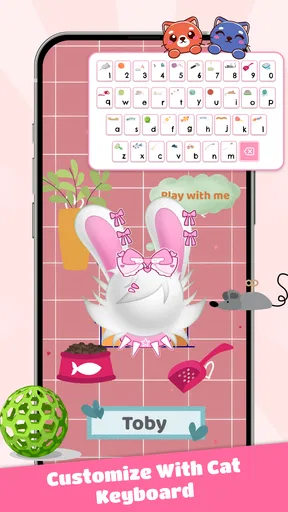
It is also easy to expect a conventional emoji keyboard. The app’s purpose is to create custom cat artwork, not necessarily to replace the keyboard’s built-in emoji system. If I wanted to send a finished creation in a message, I would think of it as an image or profile asset and use it in the way my messaging service supports. That distinction prevents disappointment when a custom design does not behave exactly like a standard Unicode emoji.
Users coming from advanced avatar platforms may also wonder why they cannot keep adjusting every tiny part. That is a fair criticism if precision is your priority. The trade-off is that a focused creator can be less intimidating and faster to learn. I see the limited scope as helpful for a first result, but restrictive for anyone who wants to draw a rare breed pattern, reproduce a real pet exactly, or control a highly specific pose.
Finally, I would avoid judging the app after only one rushed combination. The first result may feel generic simply because I stopped at the first acceptable option. The better test is whether a few intentional changes can move the character toward a distinct mood. If they can, the app is doing its job. If I still cannot get close to the identity I want, that is a sign to use a more flexible tool rather than endlessly repeating the same process.
Useful creative habits beyond the first avatar
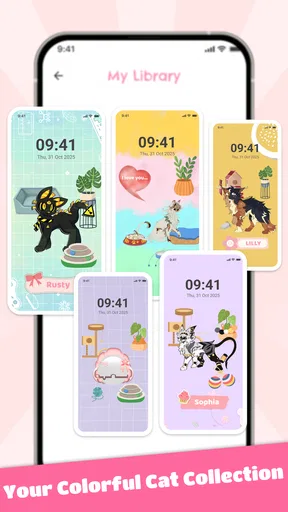
One of the most effective habits is to create a small visual family instead of one isolated image. Keep a similar core identity while changing the expression or mood. This gives me a consistent character for different contexts without making every account look identical. It is particularly useful when I want friends to recognize the avatar as mine even when the image changes.
I also like the idea of using contrast intentionally. A quiet, pale design may feel gentle but can disappear beside other profile icons. A stronger difference between the cat and its background usually makes the face easier to identify. I would test the image against both a light and a dark phone interface if I plan to use it across different services.
A third insight is to treat the avatar as communication, not just decoration. A surprised or cheerful cat can replace a short reaction when words feel too formal. A neutral expression is better for an account that needs to remain useful over time. Choosing the expression based on how I will communicate makes the creation process more purposeful.
For people who already use a drawing app, the best workflow may be to use this creator for the starting concept and another tool for finishing touches, provided the resulting image can be handled in the desired way. The cat-focused style gives a quick character foundation; a full editor offers more control afterward. That combination makes sense for someone who likes the theme but needs custom text, precise cropping, or additional design work.
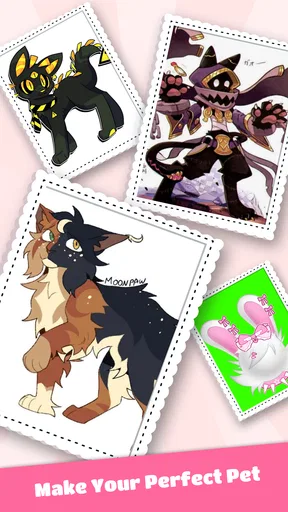
On the other hand, I would skip this app if my main goal is turning a photograph of my actual cat into a faithful portrait. The cute avatar approach is not a substitute for pet photography, tracing, or detailed digital painting. I would also choose a broader illustration app if I wanted multiple character types, freehand drawing, or a complete poster around the avatar.
How it compares with familiar alternatives
Compared with using a standard profile-photo editor, this app is much more focused. A general editor gives me cropping, filters, text, and image adjustments, but it does not necessarily help me invent a character. PFP Maker: Cat Emoji removes that blank-page problem by giving the whole experience a cat-centered direction.
Compared with a full drawing application, it is easier to approach but less open-ended. A drawing app can reproduce a specific pet or create an unusual composition, yet it asks me to supply more of the artistic work. For a quick account image, that extra control can become extra friction. I would choose the cat creator when I want a result today, and a drawing app when the process of making the picture is itself the main hobby.
It also differs from generic avatar builders because the theme is not merely one option among many. If I want a human character, a fantasy figure, or a broad collection of styles, another avatar service will probably suit me better. Here, the narrow focus is the reason to install it. Cat lovers get a more coherent visual experience, while everyone else should ask whether that theme will remain useful after the novelty fades.
The app’s free price lowers the barrier for experimentation, which matters for a tool that depends on personal taste. I can try it without treating the first design as a serious investment. Still, free does not automatically mean limitless, and I would evaluate it by the quality and usefulness of the images I can make rather than by how many options I imagine it should contain.
Who should install it and what to do next
I recommend giving it a try if you want a cat-themed profile picture, prefer illustrated identities to personal photos, or need a quick creative activity with an obvious outcome. It is particularly suitable for first-time avatar makers because the subject is clear and the goal is easy to understand: create a cat that feels like your chosen online character.
I would be more cautious if you need exact control, advanced editing, a realistic pet portrait, or a design that has no connection to cats. In those cases, a general illustration or photo-editing app will be a better long-term choice. This is not a weakness to hide; it is the natural cost of keeping the concept approachable.
My suggested next step is simple: make one profile picture for a real destination, then make a second version with a noticeably different mood. Compare them at the size where people will actually see them. If both remain clear and you enjoy choosing between them, the app has earned a place in your creative toolkit. If the process feels too restrictive before you reach a usable image, move on to a broader editor rather than forcing the wrong tool.
Overall, I see PFP Maker: Cat Emoji as a friendly, specialized app rather than a complete art platform. Its strongest quality is how quickly it turns a vague wish for a cute identity into a concrete cat character. The current release, 1.1.4, keeps that purpose straightforward, and the combination of a free download, a Everyone rating, and a low technical entry point makes it easy to test. For a first meaningful success, focus on one recognizable expression, keep the small-size view in mind, and design for where the image will actually be used.
Verdict
Strengths of PFP Maker: Cat Emoji
- Quickly creates cute cat-themed profile pictures.
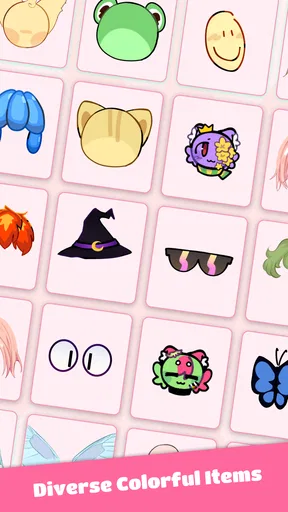
- Includes many expressive facial options and emoji-style designs.
- Simple interface suitable for users of all ages.
- Useful for social media avatars, chats, and gaming profiles.
- Lightweight app that is easy to browse and use.
Limitations of PFP Maker: Cat Emoji
- Customization may feel limited compared with full avatar editors.
- Some designs or features may require watching ads or paying.
- Export quality may not suit users needing high-resolution images.
- Cat-focused artwork offers little variety for other character styles.
- Frequent ads can interrupt the creation and saving process.
Other Releases by AthenaHotC
View All
Emoji Cat Creator: PFP Maker
Art & Design3.9

Black Centered - BLK Maker
Art & Design3.6
Similar Picks in This Category
View All
Canva: AI Photo & Video Editor
Canva4.8

PENUP – Drawing-sharing SNS
Samsung Electronics Co., Ltd.4.5

Crafto
Kutumb App4.6

Sketchbook
Sketchbook4.1

ibis Paint X
ibis inc.4.5

Adobe Express: AI Photo, Video
Adobe4.6
Frequently Asked Questions
What is PFP Maker: Cat Emoji?
PFP Maker: Cat Emoji is a creative customization app designed for making profile pictures featuring cute cat characters, emoji-style expressions, colors, accessories, and backgrounds. After testing its editing tools, I found it especially suitable for users who want to create playful avatars for social networks, messaging apps, gaming profiles, or online communities without needing advanced graphic design experience.
How do you create a profile picture in PFP Maker: Cat Emoji?
Creating an avatar is straightforward: choose a cat design, customize facial features and expressions, add accessories, select colors, and apply a background before saving the final image. The controls are generally beginner-friendly, so most users can experiment quickly. However, the exact number of available items and editing options may depend on the version of the app installed.
Is PFP Maker: Cat Emoji free to download and use?
The app can generally be downloaded without an upfront purchase, but some features, design elements, or premium content may be restricted behind advertisements or optional in-app purchases. Before downloading, users should check the current store listing for pricing details, subscriptions, and included content. The free tools are usually enough for basic avatar creation, while paid options may provide more variety.
Can I save and share the avatars created with PFP Maker: Cat Emoji?
Yes, the app is intended to let users save their finished cat avatars to the device and share them through compatible social media, messaging, or other applications. Export quality can vary depending on the selected design and the app version. It is a good idea to review the image before publishing, particularly if you plan to use it as a profile picture where cropping may occur.
Is PFP Maker: Cat Emoji safe for children and does it require an internet connection?
The app is relatively simple and focuses on avatar creation rather than communication or user-generated social content, but parents should still review its advertisements, permissions, and any purchase options before allowing children to use it. Some functions may work offline, while ads, updates, sharing, or premium content can require internet access. Always download it from the official Android or iOS store.
